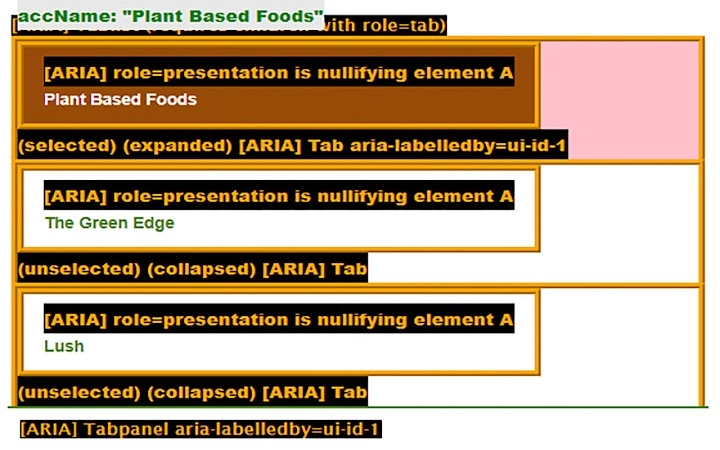

Visual ARIA: Real-Time Accessibility Insights
Overview
Visual ARIA is a specialized desktop application designed to help engineers, testers, educators, and students visualize and understand ARIA (Accessible Rich Internet Applications) usage within web technologies. The software provides real-time insights into ARIA 1.1 structural roles, live region behaviors, widget roles, proper nesting patterns, focus management, and essential attributes—both required and optional. By making invisible accessibility mechanisms visible, it supports more accurate implementation and debugging of accessible web content. The tool is particularly valuable in development and educational environments where hands-on learning and validation of accessibility standards are critical.
Target users include front-end developers building accessible interfaces, QA testers validating compliance, educators teaching web accessibility, and students learning the fundamentals of inclusive design. The software operates as a companion to web development workflows, enabling immediate feedback on how ARIA is applied in real-world scenarios. Its open-source nature under the MIT License encourages transparency, community contributions, and integration into academic and professional toolchains.
Key Features & Capabilities
- Real-Time ARIA Visualization – Displays ARIA roles, states, and properties directly on web pages, making abstract accessibility concepts tangible and observable.
- Structural Role Detection – Identifies and highlights ARIA 1.1 structural roles such as
banner,main,navigation, andcomplementaryto ensure proper page architecture. - Live Region Monitoring – Tracks dynamic content updates and alerts users when live regions are properly configured for screen reader announcements.
- Widget Role Support – Visualizes interactive ARIA widgets like
button,checkbox,slider, andtablist, with emphasis on correct state and property usage. - Nesting and Focus Management – Highlights proper hierarchical relationships between elements and indicates whether focus is correctly managed within interactive components.
- Attribute Validation – Flags missing or misused required attributes (e.g.,
aria-labelledby,aria-describedby) and suggests best practices for optional ones.
These capabilities are especially useful during development sprints, accessibility audits, and classroom demonstrations. For example, a developer can instantly verify if a modal dialog has proper aria-modal and aria-hidden states. An educator can use the tool to illustrate how focus traps work in complex UIs. The software’s design prioritizes clarity and educational value over advanced automation, making it ideal for learning and verification tasks.
User Interface, Workflow & Performance
The user interface is minimal and focused, designed to support quick inspection without clutter. Navigation is straightforward, with a central display area showing real-time ARIA annotations overlaid on web content. Controls are simple and intuitive, allowing users to toggle visibility of specific ARIA attributes or roles. The workflow integrates seamlessly into existing development practices—users can open the application, load a webpage, and immediately begin analyzing accessibility structures.
Performance behavior is not detailed in the provided documentation. The developer did not specify resource usage details. However, based on the software’s size (1.5 MB) and purpose, it is expected to operate efficiently with minimal impact on system performance. Stability is assumed to be consistent given the tool’s focused scope and open-source foundation. No reports of crashes or memory leaks were provided.
Compatibility & System Requirements
Visual ARIA is compatible with Windows, Mac, and Linux operating systems. The software version is 1.0.0 and has an installation size of 1.5 MB. The developer did not provide additional system requirements. Exact hardware specifications were not listed. Compatibility information was partially provided, and users are advised to ensure their system meets standard desktop application requirements for the respective platforms.
Pros and Cons
Pros
- Free and open-source under the MIT License
- Provides real-time visual feedback on ARIA implementation
- Supports key ARIA 1.1 features including live regions and widget roles
- Lightweight with a small installation footprint (1.5 MB)
- Designed for educational and professional accessibility validation
- Simple, focused UI that enhances usability
Cons
- No official documentation or user guides were provided
- Performance and resource usage details were not specified
- Limited to ARIA visualization—no automated testing or compliance reporting
- Dependent on browser extension for full functionality (Chrome)
- Not suitable for large-scale automated accessibility audits
FAQ Section
Is Visual ARIA available for all major operating systems?
Yes, the software is compatible with Windows, Mac, and Linux, as stated in the product information.
Is Visual ARIA safe to use?
Yes, the software is distributed under the OSI-approved MIT License, which ensures transparency and open access. It does not collect user data or install additional components beyond its core functionality.
Does the software require an internet connection?
The application itself does not require an internet connection to function. However, it relies on a Chrome extension for full functionality, which may require online access during setup or updates.
How often is Visual ARIA updated?
Update frequency was not specified. Users should check the official repository or developer profiles for the latest version and release notes.
Can Visual ARIA be used for automated accessibility testing?
No, the tool is designed for visual inspection and real-time feedback, not for automated testing or compliance reporting. It supports manual validation and learning but does not replace comprehensive testing tools.
Final Thoughts + CTA
Visual ARIA stands out as a focused, lightweight, and educational tool for anyone involved in web accessibility. Its ability to make invisible ARIA behaviors visible in real time offers immediate value to developers, testers, and educators. While it lacks automated reporting and detailed documentation, its core purpose—enhancing understanding and accuracy in ARIA implementation—is fulfilled effectively. The open-source model encourages trust and collaboration, making it a reliable addition to any accessibility-focused workflow.
For those seeking a free, practical tool to visualize and validate ARIA usage, this software delivers on its promise. Whether used in a classroom, development team, or personal learning journey, it supports the creation of more inclusive web experiences.
Download Visual ARIA now







